

Buying desktop software outright feels like a solid win. You own it, it runs locally, and nobody can pull the plug on your data. But here is the part most small business owners and freelancers discover too late: ownership does not come with a lifeline. When something breaks, when the software throws an error you cannot decode, or when a system update wipes out your settings, you are on your own unless you have a software support contract in place. These contracts fill a critical gap that purchase agreements simply do not cover, and understanding them is one of the smartest moves you can make to protect your business operations and your data.
Table of Contents
- What is a software support contract?
- The role of SLAs and coverage options
- Privacy and remote access: what to look for in offline desktop contracts
- Choosing the right software support contract for your business
- A fresh perspective: what most small businesses miss about software support contracts
- How Grit Software delivers reliable support for business owners
- Frequently asked questions
Key Takeaways
| Point | Details |
|---|---|
| Support not automatic | Buying software does not guarantee ongoing technical support—you need a dedicated contract. |
| SLA details matter | Service-level agreements in support contracts define response times and issue coverage. |
| Privacy is critical | Remote troubleshooting in offline setups requires explicit privacy terms and customer approval. |
| Choose tailored support | Select a contract matching your software, business needs, privacy standards, and escalation preferences. |
| Review before signing | Carefully review the contract for scope, SLAs, privacy, and escalation procedures. |
What is a software support contract?
A software support contract is not the same as owning software, and it is not the same as a warranty. These are three distinct things, and confusing them is one of the most common and costly mistakes small business owners make.
A warranty typically covers defects that exist at the time of purchase. It is reactive and time-limited, usually 30 to 90 days. Desktop software ownership gives you the right to use the software indefinitely, but it does not obligate the developer to help you troubleshoot, fix errors, or walk you through configuration issues. A support contract is the bridge between those two realities.
As Gartner defines it, "A software support contract is an agreement where a provider commits to provide technical support (often break/fix and troubleshooting) for specific software products for a defined period and/or under defined coverage options." That definition is precise and worth unpacking.
Break/fix support means someone helps you when something stops working. Troubleshooting means someone actively diagnoses the root cause of a problem. Both are services, not rights. And they apply to specific software, for a specific period, under specific conditions.
Here is what a solid support contract typically covers:
- Break/fix assistance: Restoring functionality when the software fails or behaves unexpectedly
- Troubleshooting and diagnostics: Identifying why a problem occurred, not just patching it over
- Defined service period: A clear start and end date for the support relationship
- Coverage options: Which software versions, modules, or use cases are included
- Communication channels: Whether support is delivered via email, phone, remote session, or on-site
"Owning software is like owning a car. You have the title, but that does not mean the dealership will fix it for free when the engine light comes on. A support contract is your service plan."
One important distinction to clarify upfront: support and maintenance are not the same thing. Support is reactive. It responds to problems. Maintenance is proactive. It delivers updates, patches, and new versions. Some contracts bundle both. Others separate them entirely. When you sign a contract, you need to know which one you are getting, or whether you are getting both.
The role of SLAs and coverage options
Now that we know what support contracts are, it is crucial to understand how SLAs and coverage options structure your actual support experience.

SLA stands for service-level agreement. It is the part of a support contract that makes the promises measurable. Without an SLA, a support contract is just a vague commitment. With one, you have specific standards the provider must meet, and you have recourse if they do not.
Software support contracts are commonly tied to service-level agreements that define measurable expectations such as response and repair targets and responsibilities. In plain terms, an SLA answers questions like: How fast will someone respond to my support request? How long before the issue is resolved? What happens if it is not resolved within that window?
Support contracts typically specify escalation and coverage modes, including product-level support tiers, which directly affects what issues are covered and how quickly they are addressed. Here is how support tiers typically break down:
| Support tier | Response time | Coverage scope | Escalation path |
|---|---|---|---|
| Basic | 48 to 72 hours | General troubleshooting | Email only |
| Standard | 24 hours | Break/fix, configuration | Email and phone |
| Priority | 4 to 8 hours | Full diagnostics, workarounds | Dedicated contact |
| Emergency | Under 2 hours | Critical failures | On-call technician |
Choosing the right tier depends on how mission-critical your software is. If you use desktop invoicing software to manage every client transaction and payment record, a 72-hour response window is not acceptable. A freelancer who uses the software occasionally might be fine with standard coverage.
Here is a practical numbered framework for evaluating SLAs before you sign:
- Identify your critical workflows. Which software functions, if broken, would stop your business cold?
- Match those workflows to response time requirements. A billing failure on invoice day is an emergency. A reporting glitch is not.
- Read the repair targets, not just the response targets. Knowing someone will respond in four hours is different from knowing they will fix it in four hours.
- Check what "escalation" means. Does the contract define a clear path if your issue is not resolved at the first level?
- Look for exclusions. Many contracts exclude issues caused by user error, third-party integrations, or unsupported operating systems.
Pro Tip: Always ask the provider to list what is not covered in writing. Exclusions buried in fine print are where most support disputes begin.
Privacy and remote access: what to look for in offline desktop contracts
Beyond service quality, privacy and remote access terms are vital. Let us dig into how contracts protect your sensitive information.
This is where offline desktop software creates a unique dynamic. Because your data lives on your local machine rather than in the cloud, any remote support session requires the provider to access your device directly. That is a significant privacy consideration, and it must be addressed explicitly in the contract.
For offline desktop software, the support contract should explicitly address whether the provider needs remote access and how privacy is handled if they view personal data during troubleshooting. This is not a hypothetical concern. A technician diagnosing a problem with your invoicing software may inevitably see client names, payment amounts, or contact details. The contract needs to define what happens to that information.
Privacy and data-handling terms in support arrangements often distinguish between what tools are designed to collect and how any personal data that is inadvertently accessed during troubleshooting will be handled. That distinction matters enormously.
Here is a breakdown of the key privacy terms to look for:
| Privacy term | What it means | Why it matters |
|---|---|---|
| Remote access authorization | Provider needs explicit approval before connecting | Prevents unauthorized access |
| Incidental data handling | Rules for data seen but not targeted | Protects client confidentiality |
| Data retention policy | How long any session logs are kept | Limits exposure after the session |
| Screen recording disclosure | Whether sessions are recorded | Affects your legal obligations |
| Backup requirements | Who is responsible for data backup before access | Protects against accidental data loss |
The key things to confirm before signing any offline desktop support contract include:
- No remote access without your explicit, written or in-session approval
- Clear statement that the provider will not retain, copy, or share any data viewed during a session
- Defined backup responsibility before any remote session begins
- A privacy policy that covers support interactions specifically, not just product use
- Explicit language on what happens if personal data is accidentally exposed
Pro Tip: Before any remote support session, take a manual backup of your data. Even if the contract assigns backup responsibility to the provider, you want your own copy as an independent safeguard.
Choosing the right software support contract for your business
Having parsed the principles and privacy requirements, let us turn to how you choose the right support contract for your unique business context.
The decision is not just about price. It is about risk. A freelancer managing 15 active clients on desktop invoicing software faces a different risk profile than a small business owner with 200 clients, recurring billing cycles, and a team of three. Your contract needs to match your actual exposure.
The right framework for small businesses and freelancers treats the support contract as three things working together: the scope of covered products and support types, a measurable SLA for response, repair, and assistance, and explicit privacy terms for remote troubleshooting or access, or a clear "no remote access unless approved" posture.
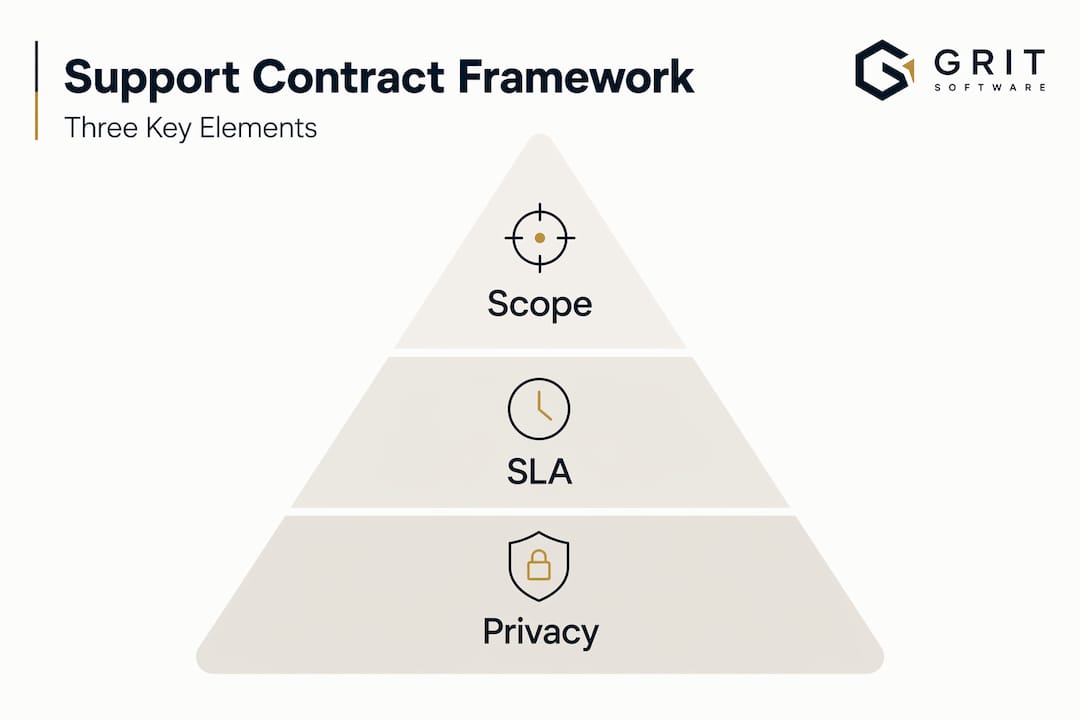
Start by identifying exactly which software is covered. Some contracts apply to a single product version. Others cover a product family. If you upgrade your software, does coverage carry over? That question alone can save you a frustrating argument later.
Edge cases in offline desktop setups deserve special attention. Incidents that require vendor access to diagnose difficult issues can create data privacy exposure even when software normally runs locally. The contract should state the authorization boundaries and backup expectations before any access occurs.
Here is a numbered checklist for evaluating any support contract:
- Confirm the covered software list. Is it version-specific? Does it cover future updates?
- Verify the SLA metrics. Response time, resolution time, and escalation path must all be measurable.
- Read the privacy and remote access terms. They should be explicit, not implied.
- Understand the escalation procedure. Who do you contact when first-level support fails?
- Check the contract renewal terms. Does pricing change at renewal? Can coverage tiers be adjusted?
Questions to ask before signing any software support contract:
- What specific issues are excluded from coverage?
- Is maintenance (updates and patches) included, or is that a separate agreement?
- What is the process for requesting a remote support session, and who authorizes it?
- How are support requests submitted, and what confirmation will I receive?
- What happens to my support history if the provider changes ownership or closes?
- Can I downgrade or upgrade my coverage tier mid-contract?
These questions are not bureaucratic. They are the difference between a contract that protects you and one that leaves you exposed when you need help most.
A fresh perspective: what most small businesses miss about software support contracts
With practical steps in hand, let us explore what most small businesses overlook, and how to turn those insights into better outcomes.
Here is the uncomfortable truth: most small business owners and freelancers sign support contracts the same way they click through terms of service. Quickly, without reading, and with the assumption that it will never matter. Then it matters.
The biggest misconception is that owning software creates an ongoing support relationship. It does not. A one-time purchase gives you a license to use the software. It does not give you a phone number to call, a guaranteed response time, or any protection for your data during troubleshooting. Those things require a separate, deliberate agreement.
The second thing most businesses miss is the value of responsive, privacy-aware support versus cheap support. A low-cost contract with a 72-hour response window sounds fine until your invoicing software crashes the morning a major client payment is due. At that point, the cost difference between basic and priority coverage feels very different.
Escalation clarity is another area where contracts routinely fall short. Many agreements describe a support process without defining what happens when that process fails. Insist on a written escalation path. Who is the second contact? What is the timeline for escalation? What remedies are available if the issue remains unresolved?
One more thing most businesses overlook: contracts age. Your business needs in year one are not the same as your needs in year three. Tailored software support should evolve with your operations. Revisit your contract annually. Ask whether your current tier still matches your risk profile. Check whether new software features you rely on are covered. A contract that fit perfectly at signing can become dangerously inadequate as your business grows.
The businesses that get the most value from support contracts are the ones that treat them as living documents, not filing cabinet paperwork.
How Grit Software delivers reliable support for business owners
If you have been nodding along to everything above, you already understand why the right support contract is as important as the software itself.
Grit Software builds business desktop software solutions designed for small business owners and freelancers who want to own their tools outright, keep their data local, and never depend on a cloud subscription. OwnInvoice, the flagship product, handles quotes, invoices, payments, and client records entirely offline. And because we understand the support gap that comes with desktop software, we offer support contracts built specifically for this model. Clear SLAs, privacy-aware troubleshooting, explicit remote access boundaries, and coverage tiers that match real small business needs. No vague promises. No hidden exclusions. Just reliable support from a team that built the software and knows it inside out.
Frequently asked questions
Is technical support included when I purchase desktop software?
Technical support is usually not included by default. A separate support contract is typically required for ongoing break/fix assistance, troubleshooting, and defined response times.
What should I look for in a software support contract for offline software?
Focus on a clear scope of covered products, measurable SLA response and repair targets, and explicit privacy terms for remote troubleshooting, including a firm "no remote access without approval" policy.
How are privacy concerns managed during remote support sessions?
Contracts should require customer authorization before any remote access and specify how inadvertently accessed data is handled, including retention, sharing, and deletion policies.
Do all support contracts include software maintenance and security updates?
Not always. Some vendors distinguish between support (troubleshooting) and maintenance (patches and new versions), so always confirm in writing whether security updates and bug fixes are part of your agreement.